AutomationView
AutomationView is the Visual Studio Code sequence and machine editor extension (rcautomsolutions.automationview) for industrial automation engineers.
Design, simulate, and verify your PLC sequences visually on the canvas, test them against plant models and automated scenarios, then export to CODESYS, Siemens TIA Portal (SCL), Rockwell Studio 5000, or Arduino C++. FANUC robot programs are available as a code preview.
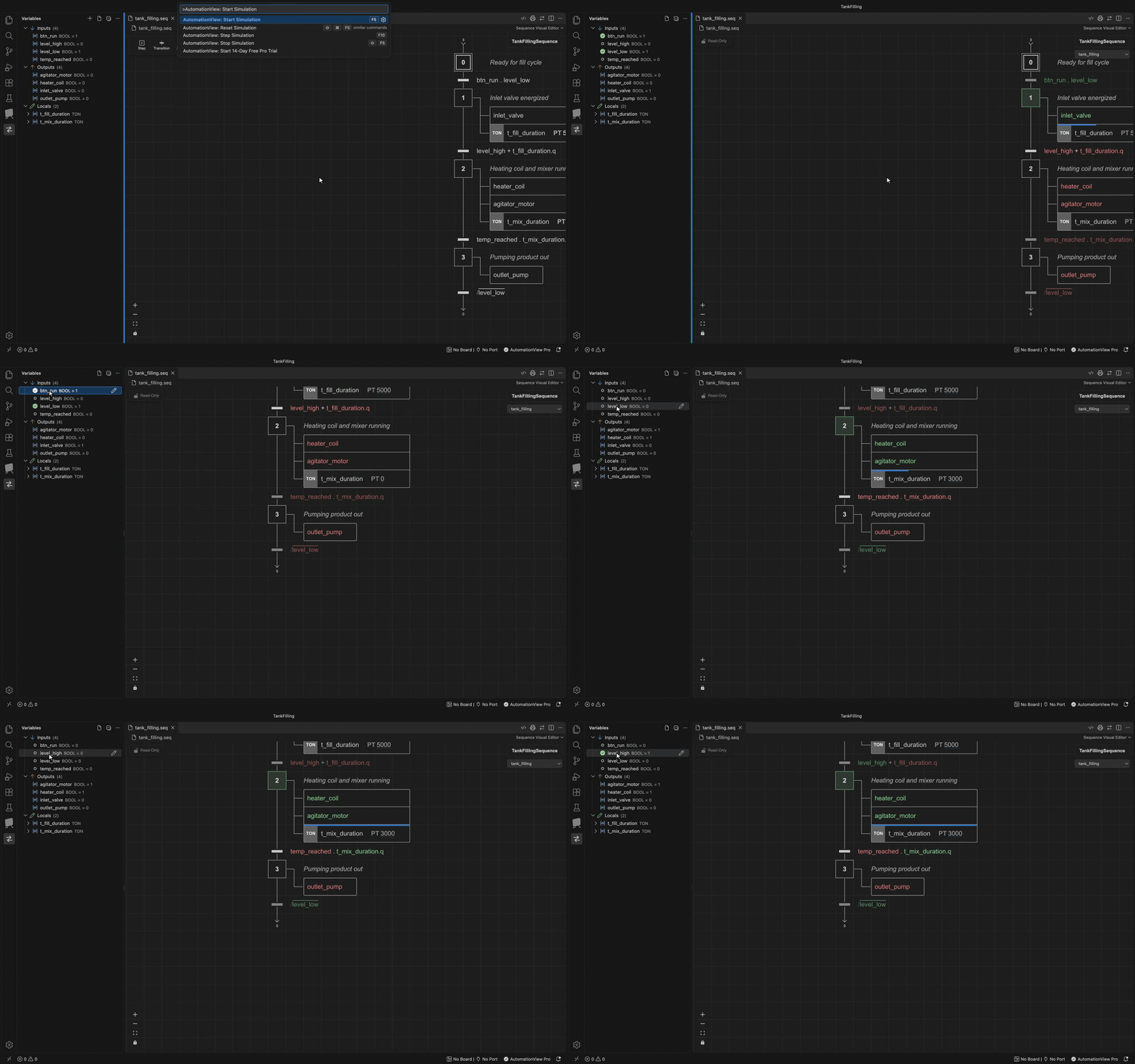
Clicking inputs in the Variables view moves the active step through the sequence while the TON timers run.
Start in 30 Seconds
- Install the Extension: Search for AutomationView (
rcautomsolutions.automationview) in the VS Code Extensions view (Ctrl+Shift+X / Cmd+Shift+X) and click Install. Python 3.14 and all 9 PLC and robot plugins are built in. - Launch a Project in 1 Click: Click the AutomationView icon in the left Activity Bar and select Try Instant Demo Project (1-Click) (
automationview.createQuickDemoProject) to test a ready-made station immediately, or click Create an AutomationView Project (automationview.openProjectGallery) to start from a template. - Simulate & Export: Press F5 to start the scan-cycle simulator, click inputs in the Variables view to toggle them live, and preview or export your PLC code.
Why AutomationView?
- Design Visually: Build SFC / Grafcet sequences, dynamic templates, and boolean sequence options directly on an interactive canvas.
- Configure Your Machine in One Place: Manage export targets, sequence instances, hardware racks, custom
STRUCT/ENUMdatatypes, and variables across five visual tabs in the Machine Editor. - Simulate Before Commissioning: Run scan-cycle simulations, force steps and I/O live, connect
plant.yamlor.mjsplant models, and execute.yamltest scenarios. - Collaborate with Git: Track deterministic
.seqand.machinetext files with visual canvas diffing.
Key Features
- Visual Sequence Editor: Build steps, transitions, step/transition actions, and branches with single-key shortcuts.
- Dynamic Sequences & Sequence Options: Create reusable equipment modules with
{variable}placeholders and per-instance boolean options (ON/OFF). - Machine Editor: Configure Project, Instances, Architecture, Datatypes, and Variables visually.
- Custom Datatypes: Define
STRUCTrecords,ENUMstate lists, and multi-dimensional arrays. - Simulation & Plant Models: Validate logic with live forcing, plant models, and automated
.yamltest scenarios. - Smart Diagnostics: Catch deadlocks, unreachable steps, type mismatches, and address collisions in real time.
- Translation & Code Export: Generate Structured Text, SCL, Ladder, PLCopen XML, L5X, and Arduino C++, plus a FANUC TP code preview.
- Version Control: Branch, merge, and inspect visual sequence diffs in Git.
- Internationalization: Available in English, French, German, Spanish, and Portuguese.
What's Ahead
Explore upcoming capabilities on the Roadmap and recent updates in the Release Notes.
Sections
- Features: Core capabilities of AutomationView
- Guides: Step-by-step tutorials and industrial design patterns
- Reference: Commands, instructions, qualifiers, settings, and API reference
- FAQ: Frequently Asked Questions
Quick Links
- Your First Project: Build a pneumatic transfer station from scratch
- Visual Sequence Editor: Interactive SFC canvas and keyboard shortcuts
- Machine Editor: Configure instances, hardware, datatypes, and variables
- Reusable Modules with Options: Parameterize reusable equipment modules