¶ Smart Completion
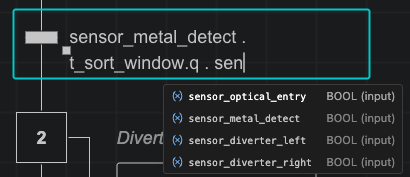
Smart Completion provides instant, type-ranked suggestions in the Sequence Editor when you edit transition conditions, action conditions, expressions, and instruction operands.
¶ What Gets Completed
| Context | Suggestions Provided |
|---|---|
| Variables | Input, output, local, and dynamic {variable} names ranked by expected data type |
| Struct & Compound Fields | Member fields after typing . (for example station.cylinder.extended or timer_1.Q) |
| Enum Values | Declared enumeration values (for example Mode.AUTO, Mode.MANUAL) |
| Step References | Local step names (Step10.X) and cross-sequence step states (OtherSeq.Step20.X) |
| Operators & Literals | IEC 61131-3 logical/comparison operators (AND, OR, NOT, ==, <>, <=, >=) and time literals (T#5s, T#100ms) |
| Action Qualifiers | Standard IEC 61131-3 qualifiers (N, S, R, P, L, D, SD, DS, SL) |
| Instructions | All supported PLC instructions grouped by category |
¶ Supported Instruction Categories
Smart Completion and the instruction picker offer all built-in PLC instructions:
- Boolean: SR, RS, R_TRIG, F_TRIG
- Timers: TON, TOF, TP, RTO
- Counters: CTU, CTD,
CTUR,CTDR - Arithmetic: ADD, SUB, MUL, DIV,
MOD - Comparison: GT, GE, LT, LE, EQ, NE
- Data: MOVE
- String:
CONCAT,LEN,LEFT,RIGHT,MID,FIND,REPLACE,INSERT,DELETE - Conversion:
INT_TO_STRING,DINT_TO_STRING,REAL_TO_STRING,STRING_TO_INT,STRING_TO_REAL,BOOL_TO_STRING
¶ Using Smart Completion
- Start typing in any condition, expression, or operand field to open the suggestion popup automatically.
- Press Ctrl+Space to trigger the suggestion list manually.
- Use the Up and Down arrow keys to select an item.
- Press Tab or Enter to insert the selected symbol.
¶ See Also
- Visual Sequence Editor - Edit transitions, actions, and expressions visually
- Variable Management - Declare variables, structs, enums, and arrays
- Qualifiers Overview - Reference for all action qualifiers
- Instructions Overview - Reference for all PLC instructions