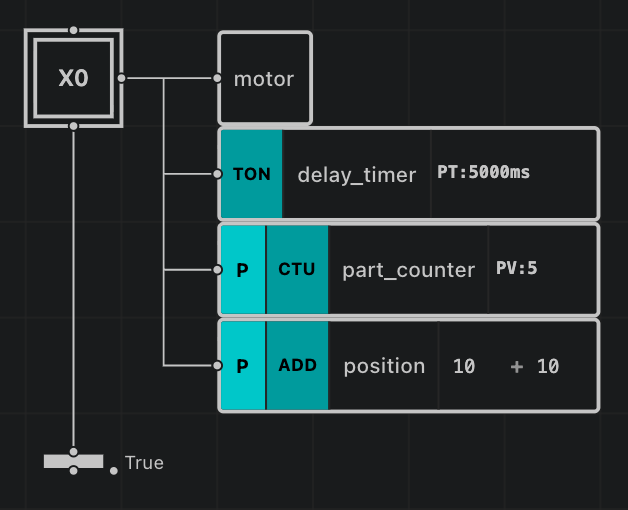
All supported action instructions in AutomationView, organized by category. Combine instructions with Action Qualifiers and optional action conditions ([cond]) in the Sequence Editor.
Function-block instructions that operate on BOOL variables:
| Instruction |
Description |
| SR |
Set-Reset bistable latch (set-dominant) |
| RS |
Reset-Set bistable latch (reset-dominant) |
| R_TRIG |
Rising-edge detector (FALSE to TRUE pulse) |
| F_TRIG |
Falling-edge detector (TRUE to FALSE pulse) |
Function-block instructions that measure and control durations:
| Instruction |
Description |
| TON |
On-Delay Timer — output .Q turns TRUE after .PT |
| TOF |
Off-Delay Timer — output .Q stays TRUE for .PT after .IN turns FALSE |
| TP |
Pulse Timer — outputs a fixed-duration pulse .PT |
| RTO |
Retentive On-Delay Timer — accumulates elapsed time across activations; resets via optional R input |
| Field |
Type |
Description |
.IN |
BOOL |
Enable input signal |
.R |
BOOL |
Reset input signal (RTO only) |
.Q |
BOOL |
Output signal (TRUE when elapsed time reaches preset) |
.PT |
TIME |
Preset duration (T#5s, 2000, or numeric variable) |
.ET |
TIME |
Current elapsed time |
Function-block instructions that count rising-edge events:
| Instruction |
Description |
| CTU |
Count-Up Counter — increments .CV on each rising edge; optional R reset input |
| CTD |
Count-Down Counter — decrements .CV on each rising edge; optional LD load input |
| CTUR |
Resettable Count-Up Counter with dedicated R reset operand |
| CTDR |
Resettable Count-Down Counter with dedicated LD load operand |
| Field |
Type |
Description |
.CU / .CD |
BOOL |
Count-up / Count-down input |
.R / .LD |
BOOL |
Reset (CTU/CTUR) or Load (CTD/CTDR) input |
.Q |
BOOL |
Output signal (TRUE when target count is reached) |
.PV |
INT |
Preset target value |
.CV |
INT |
Current accumulated count |
| Instruction |
Operands |
Description |
| MOVE |
IN -> target |
Copy source value IN to the target variable |
| Instruction |
Operands |
Description |
| ADD |
IN1, IN2 -> target |
Addition (IN1 + IN2) |
| SUB |
IN1, IN2 -> target |
Subtraction (IN1 - IN2) |
| MUL |
IN1, IN2 -> target |
Multiplication (IN1 * IN2) |
| DIV |
IN1, IN2 -> target |
Division (IN1 / IN2) |
| MOD |
IN1, IN2 -> target |
Modulo remainder (IN1 MOD IN2) |
Combine arithmetic instructions with the P (Pulse) qualifier to execute once when the step activates, or N to execute on every scan cycle.
| Instruction |
Operands |
Description |
| GT |
IN1, IN2 -> target |
Greater than (IN1 > IN2) |
| GE |
IN1, IN2 -> target |
Greater than or equal (IN1 >= IN2) |
| LT |
IN1, IN2 -> target |
Less than (IN1 < IN2) |
| LE |
IN1, IN2 -> target |
Less than or equal (IN1 <= IN2) |
| EQ |
IN1, IN2 -> target |
Equal (IN1 == IN2) |
| NE |
IN1, IN2 -> target |
Not equal (IN1 <> IN2) |
Manipulate STRING variables using IEC 61131-3 String Instructions:
| Instruction |
Operands |
Description |
| CONCAT |
IN1, IN2 -> target |
Concatenate two strings (IN1 + IN2) |
| LEN |
IN -> target (INT) |
Return the character length of IN |
| LEFT |
IN, L -> target |
Extract the leftmost L characters of IN |
| RIGHT |
IN, L -> target |
Extract the rightmost L characters of IN |
| MID |
IN, L, P -> target |
Extract L characters from IN starting at 1-based position P |
| FIND |
IN1, IN2 -> target (INT) |
Return the 1-based start position of IN2 inside IN1 (0 if not found) |
| REPLACE |
IN1, IN2, L, P -> target |
Replace L characters in IN1 at position P with IN2 |
| INSERT |
IN1, IN2, P -> target |
Insert IN2 into IN1 after position P |
| DELETE |
IN, L, P -> target |
Delete L characters from IN starting at position P |
Convert values between numeric, boolean, and string types using Type Conversion Instructions:
| Instruction |
Operands |
Description |
| INT_TO_STRING |
IN (INT) -> target (STRING) |
Convert 16-bit integer to string |
| DINT_TO_STRING |
IN (DINT) -> target (STRING) |
Convert 32-bit integer to string |
| REAL_TO_STRING |
IN (REAL) -> target (STRING) |
Convert floating-point number to string |
| STRING_TO_INT |
IN (STRING) -> target (INT) |
Parse string as 16-bit integer |
| STRING_TO_REAL |
IN (STRING) -> target (REAL) |
Parse string as floating-point number |
| BOOL_TO_STRING |
IN (BOOL) -> target (STRING) |
Convert boolean to "TRUE" or "FALSE" |
Sequence Visual EditorPythonfrom automation_machine import Sequence, StepType, ActionQualifier, ActionInstruction
class MyMachine(Sequence):
def setup(self):
step = self.add_step(StepType.INITIAL, name="Running")
step.add_action("motor", "Main motor running")
step.add_action("delay_timer", "Startup delay", instruction=ActionInstruction.TON, duration=5000)
step.add_action("part_counter", "Count produced parts", qualifier=ActionQualifier.P, instruction=ActionInstruction.CTU, preset_value=100)
step.add_action("position", "Increment position", qualifier=ActionQualifier.P, instruction=ActionInstruction.ADD)
MyMachine()