¶ Equipment Catalog
The Equipment Catalog is a browsable library of industrial hardware — PLC controllers, remote I/O modules, valve terminals, drives, sensors, and actuators. Adding catalog items in the Machine Editor automatically populates hardware channels and %I / %Q addresses.
¶ Opening the Catalog
- Click the AutomationView icon in the Activity Bar and expand the Equipment Catalog panel, or open the Architecture tab in
main.machine. - Use the search bar to filter modules by manufacturer, product family, or equipment ID.
- Click any module to view its electrical specifications, supported fieldbus protocols, and channel layout.
¶ Official Hardware Extensions
Install vendor extensions from the Marketplace to populate the catalog:
| Extension | Hardware Contributed |
|---|---|
| AutomationView - CODESYS | CODESYS V3 generic controllers and runtime targets |
| AutomationView - Siemens | SIMATIC S7-1200 and S7-1500 controllers and I/O modules |
| AutomationView - Rockwell | Allen-Bradley ControlLogix and CompactLogix controllers and I/O |
| AutomationView - Festo | CPX-E remote I/O modules and VTUG valve terminals |
¶ Adding Hardware in the Machine Editor
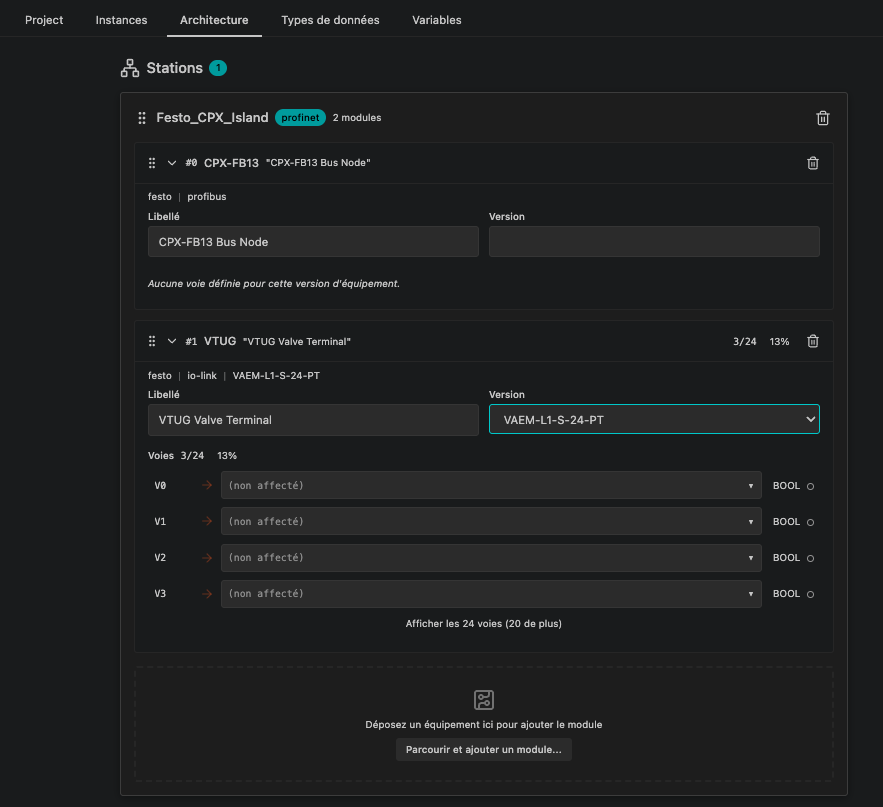
Configure hardware stations and modules in the Machine Editor Architecture tab:
- Open
main.machineand select the Architecture tab. - Click Add Station, enter a station name, and choose its fieldbus protocol (
profinet,ethercat,ethernet-ip,io-link,modbus-tcp,modbus-rtu,canopen,profibus,as-interface, oropc-ua). - Click Add Equipment on the station card and pick a controller or I/O module from the catalog.
- AutomationView automatically generates the module's input and output channels with their default data types (
BOOL,INT,REAL,BYTE,WORD) and hardware addresses. - Select or type a variable name in each channel row to bind the physical signal to your sequence logic.
¶ Catalog Commands
| Command | Action |
|---|---|
| AutomationView: Show Equipment Details | Open the specification and channel sheet for the selected catalog item |
| AutomationView: Copy Equipment ID | Copy the vendor equipment ID (for example festo.io.cpx-e-8di) to the clipboard |
| AutomationView: Refresh Equipment Catalog | Reload all installed hardware provider extensions |
¶ See Also
- Machine Editor - Configure stations and modules on the Architecture tab
- Variable Management - Map variables to
%Iand%Qchannels - Extensions - Install hardware and platform extensions
- PLC Target Matrix - Supported platforms and export formats